Terraform Drift Detection: A Safe Workflow for Production
A practical workflow for detecting infrastructure changes outside Terraform, deciding whether to import or revert them, and reducing repeat drift.
TL;DR: Detect first, then decide
Terraform drift occurs when real infrastructure no longer matches the configuration and state that Terraform is expected to manage. A safe response is to run a read-only plan or health assessment, classify the change, confirm ownership, and then choose one of three paths: update code, import the intended resource, or revert the out-of-band change. CloudLink's DevOps retainer is the relevant destination for teams that need this workflow maintained across environments.
1. Define what “drift” means for the workspace
Not every difference deserves an immediate apply. Provider-computed values, managed service updates, emergency changes, and resources that Terraform does not own can appear differently from the declared configuration. Document which resources are managed, which attributes are intentionally external, and which environments may be changed manually during an incident.
2. Detect without changing production
Run a read-only Terraform plan against the correct workspace and provider credentials, or use a platform health assessment where available. Capture the plan output, state version, workspace, commit, and timestamp. HashiCorp describes drift detection as a health check comparing real infrastructure with the Terraform configuration and state; that comparison is evidence, not authorization to apply.
3. Classify the change before remediation
For each difference, ask who changed it, why it changed, whether the change is still desired, and whether code or state should become the new source of truth. An approved emergency fix usually belongs in version-controlled configuration after the incident. An unmanaged resource may need an import. An accidental console edit may need a reviewed revert.
4. Reduce repeat drift
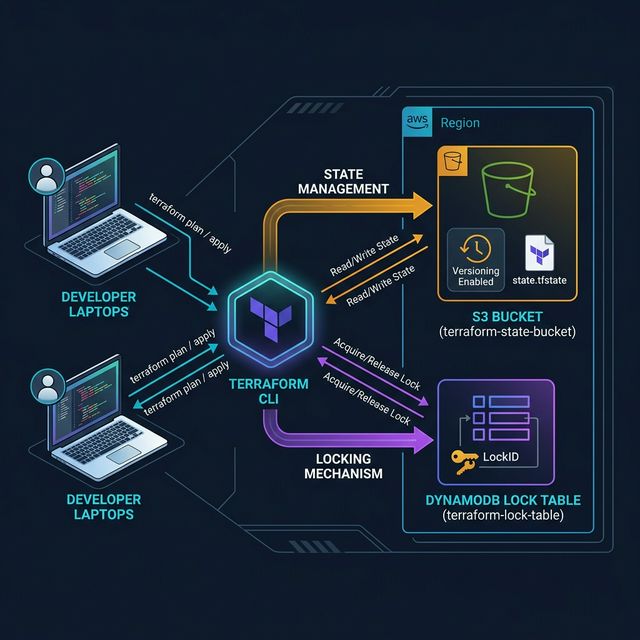
Use least-privilege access, review infrastructure changes through pull requests, schedule drift checks, and route findings to an owner with a severity and due date. The CloudLink documentation is the adjacent internal reference when state access, locking, and recovery need to be documented.
What the runbook must not claim
Do not claim that drift detection prevents all unauthorized changes, that every plan is safe to apply, or that a provider health check covers unmanaged infrastructure. Coverage depends on the resources, provider behavior, state quality, credentials, and schedule you configure.
Need Expert DevOps Help?
Get a free infrastructure audit from our senior engineers. No commitment, real insights.
Explore the DevOps Retainer