Terraform State: Remote Backends & DR
Configure S3+DynamoDB state locking, implement disaster recovery workflows, and avoid the dreaded state corruption.
Why Remote State Matters
Terraform state is the source of truth for your infrastructure. Losing state means Terraform can't track what it manages, leading to orphaned resources and potential configuration drift. Local state files are a ticking time bomb for any team.
Remote state backends solve three problems: team collaboration (shared access), state locking (prevent concurrent modifications), and durability (encrypted backups).
S3 + DynamoDB Configuration
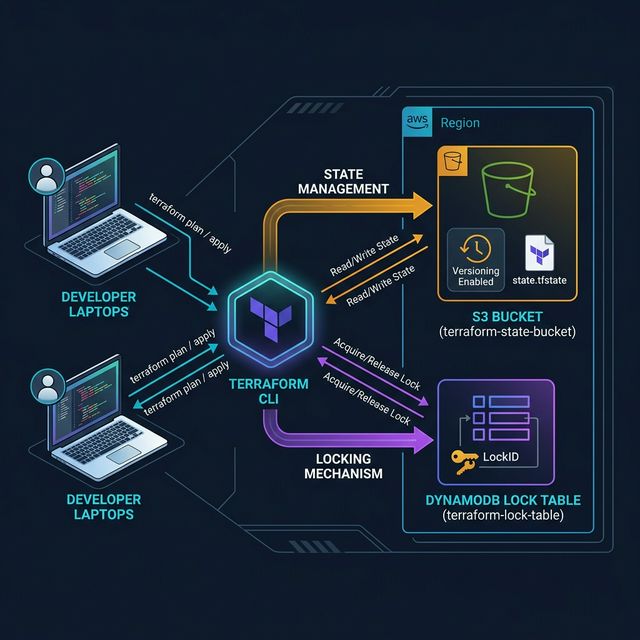
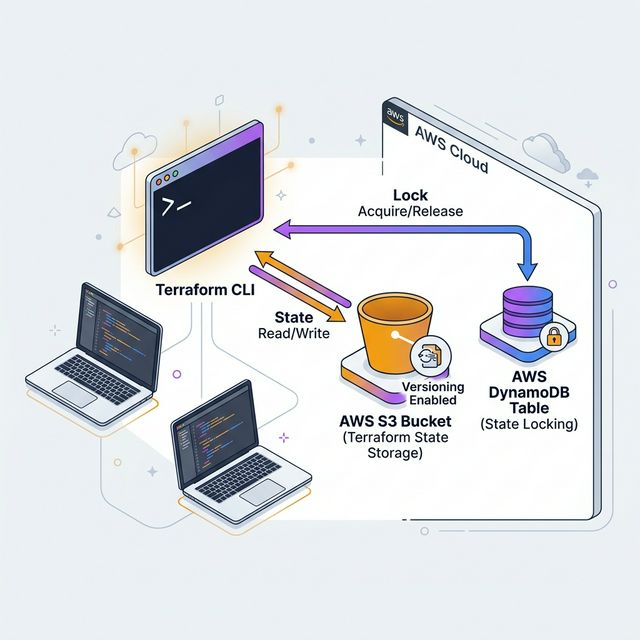
The gold standard for AWS users is S3 for state storage with DynamoDB for locking. Enable versioning on S3 for state history, use SSE-S3 or SSE-KMS encryption, and enable MFA Delete for critical environments.
Create a dedicated "terraform-state" S3 bucket per AWS account with a DynamoDB table for locking. Use a naming convention like company-terraform-state-{account}-{region}.
terraform {
  backend "s3" {
    bucket         = "acme-terraform-state-prod-us-east-1"
    key            = "network/terraform.tfstate"
    region         = "us-east-1"
    dynamodb_table = "terraform-locks"
    encrypt        = true
  }
}
Disaster Recovery Workflows
State corruption is recoverable if you have versioning enabled. Use aws s3api list-object-versions to find previous versions and restore with aws s3api get-object --version-id.
For catastrophic scenarios, terraform import can reconstruct state resource by resource. Document your import commands for critical resources (VPCs, RDS instances, EKS clusters) as part of your DR playbook.
State Management Best Practices
Split state by environment and component. Don't put everything in one state file — a network state file, a compute state file, and an application state file per environment gives you isolation and faster plan/apply cycles.
Use Terraform workspaces sparingly. For most teams, separate directories per environment with shared modules is cleaner than workspaces.
| State File | Resources | Change Frequency |
|---|---|---|
| network/ | VPC, Subnets, NAT, Route Tables | Rare |
| compute/ | EKS, Node Groups, ASG | Weekly |
| data/ | RDS, ElastiCache, S3 | Monthly |
| app/ | Lambda, API Gateway, CloudFront | Daily |
pages.blog.ctaTitle
pages.blog.ctaDesc